How to Download Your Instagram (and Threads) Data — Full Step-by-Step Guide
Updated June 2026
To find out who doesn’t follow you back, you first need your own follower data from Instagram (and Threads, if you use it). Instagram hides this behind a few menus, so here’s the exact path — tap by tap — plus what to choose, how long it takes, and the spots people usually get stuck.
Before you start
- You can do this on the Instagram app (iPhone/Android) or on instagram.com in a browser. Both work.
- You’ll get a ZIP file by email — usually within ~10 minutes, sometimes up to a few hours.
- Pick the JSON or HTML format. Either works with UnfollowScan.
Step 1 — Open Accounts Center
In the Instagram app, tap your profile picture (bottom right) → the ☰ menu (top right) → Settings and activity. At the very top, tap Accounts Center (it says “Meta · Accounts Center” and manages Instagram, Threads, and Facebook together).
Step 2 — Open “Download your information” → Create export
- In Accounts Center, tap Your information and permissions → Download your information.
- On the “Export your information” screen, tap the blue Create export button.
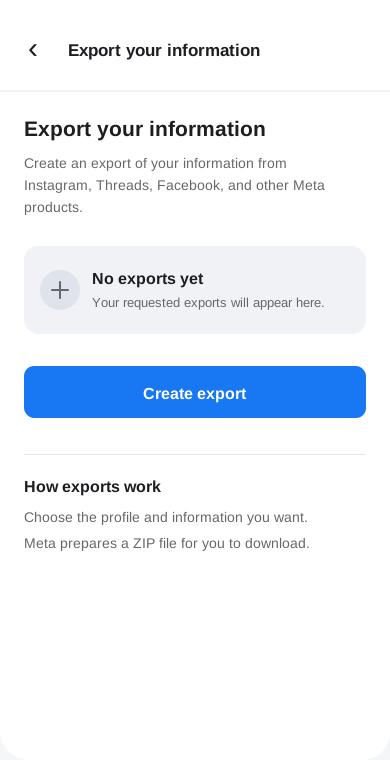
Step 3 — Choose a profile (Instagram and/or Threads)
On “Choose a profile”, pick your Instagram account. Use Threads too? Your Threads profile is listed right here as well — select it to get Threads non-followers from the same export.
Step 4 — Choose where to export
On “Choose where to export”, tap Export to device (not “Export to external service”).
Step 5 — Confirm your export: Customize info, date, format
You land on the “Confirm your export” screen. Three settings matter:
- Customize information → tap it, then Clear all, scroll to the Connections section, and check only “Followers and following”. Tap Save. (This is the step that saves you time — don’t export everything.)
- Date range → set to All time.
- Format → JSON (easiest) or HTML — both work with UnfollowScan.
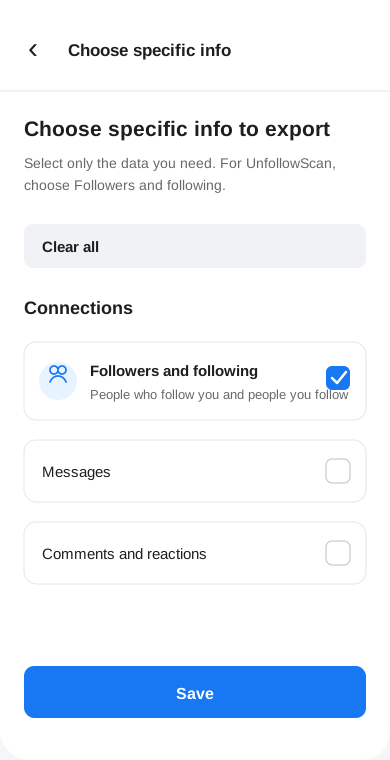
Then tap Start export.
Step 6 — Wait for the email, then download
Meta prepares the file in the background. You’ll get a notification and an email titled something
like “Your Instagram information is ready to download.” Open it, tap Download, and
re-enter your password if asked (that’s Meta’s own site — safe). You’ll get a .zip
file. Inside you’ll find files like followers_1.json and following.json
(or .html versions).
Step 7 — Upload it and see the results
Drop that ZIP into UnfollowScan. It compares your followers and following right in your browser — no login, nothing uploaded — and shows exactly who doesn’t follow you back. The same file covers your Threads non-followers too.
Stuck? Common issues
- Can’t find Accounts Center: update the app — older versions hide it under Settings → Privacy.
- Email hasn’t arrived: check spam, and wait — large accounts can take a few hours.
- Exported everything by mistake: the ZIP still works; UnfollowScan just reads the followers/following files and ignores the rest.
- Picked HTML and not sure: that’s fine — upload it as-is.
Once you’ve got your list, see how to unfollow safely without getting action-blocked — and remember some “non-followers” are just deactivated accounts.
Want to check yours right now?
Upload your Instagram data export and track cleanup signals over time — free, no login, analyzed in your browser.
Scan my followers →